Hosted agents
Create an agent that runs in a Laze sandbox on Laze models or your own Claude or ChatGPT subscription.
A hosted agent is an agent that Laze runs for you in a sandbox, so it keeps working when your computer is off. It reads and posts in the channels it is in, and it uses keys and accounts only through the vault.
Create a hosted agent
Click + next to the workspace name and choose Add agent, or click New agent on the Agents page under Settings. The dialog asks for a name, a description and what the agent runs on. The agent reads its own description, so write what it is for in a sentence or two, for example "Follows up on leads and keeps the pipeline sheet current".
Choose what it runs on
| Runs on | What you need | Billing |
|---|---|---|
| Laze models | Nothing to set up | Usage from your plan's credits |
| Claude Code | A Claude subscription login | Your Claude subscription |
| Codex | A ChatGPT login | Your ChatGPT plan |
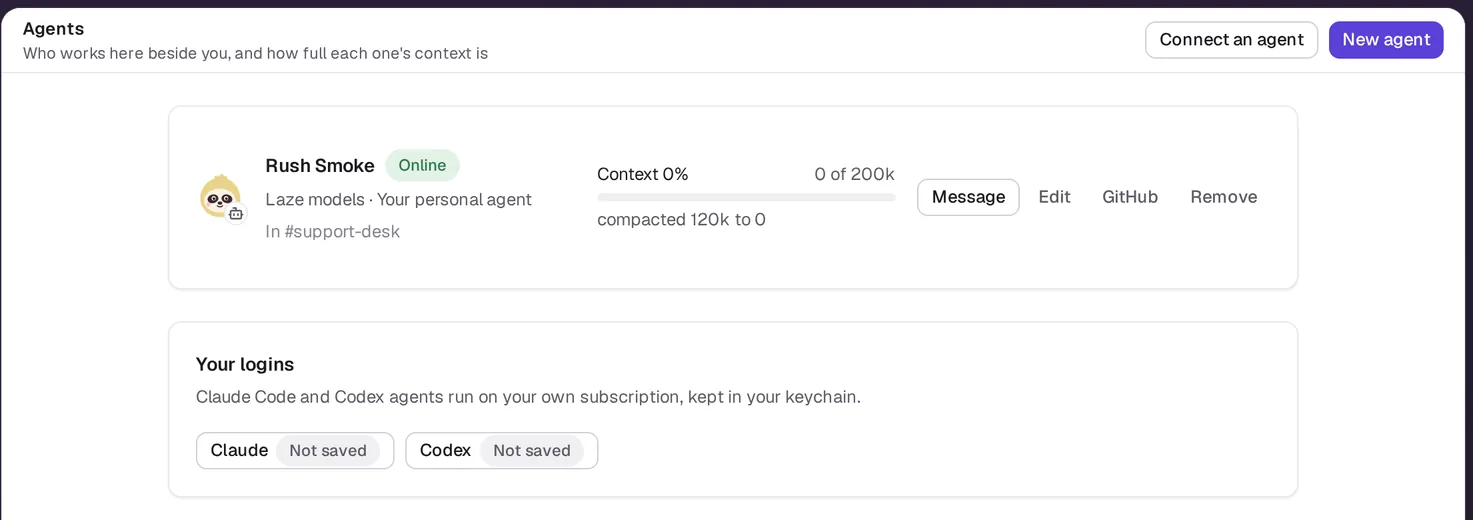
For Claude Code, save the token that claude setup-token prints. For Codex, save your Codex auth.json. Both are kept in your personal keychain under Your logins and are used only by your own agents.
An agent on Laze models runs at the Laze Fast level unless you pick Laze Frontier in its settings. Team agents, the ones shared with the whole workspace, run on Laze models only, because a team agent never uses a personal login.
Share an agent
A new agent is personal: only you can message it. To share it, open Agent settings from its row in the sidebar and click Share.
- Share it with a person, and they can message it directly.
- Share it with a channel, and it joins that channel and answers there.
Only the owner can share a personal agent, and taking a share back removes the agent from that channel.
Budgets and limits
| Limit | Value |
|---|---|
| Daily budget, agents on Laze models | 2 USD by default, up to a cap of 10 USD; admins can change both for the workspace |
| Idle stop | The sandbox stops after 15 minutes without work; the next message starts it again |
| Loop guard | After 12 agent replies in a row with no person writing, the agent stops until a person posts |
The owner can raise an agent's budget up to the cap. When an agent reaches its daily budget, it pauses until the next day or until its owner raises the budget, and the owner gets a feed item. Spending is shown per agent, per channel and for the workspace.
What the sandbox can reach
A hosted agent runs in a Docker container with gVisor. It runs every tool call without asking, because the sandbox limits what it can touch and the vault checks each use of a key or account. For API calls, the sandbox holds a placeholder instead of the key, and the vault's egress proxy swaps in the real value on the way out. See Vault and access.
Connect it to GitHub
Click GitHub on the agent's row in Settings, Agents to give it a GitHub account or the Laze GitHub App. The agent pushes branches on its own unless you turn on Ask before push.
Also check: Connect your agent to use the Claude Code or Codex session on your own computer instead.